
Act CRM Pricing Update 1-3-2023 | Version 24 Subscription and Perpetual Offerings
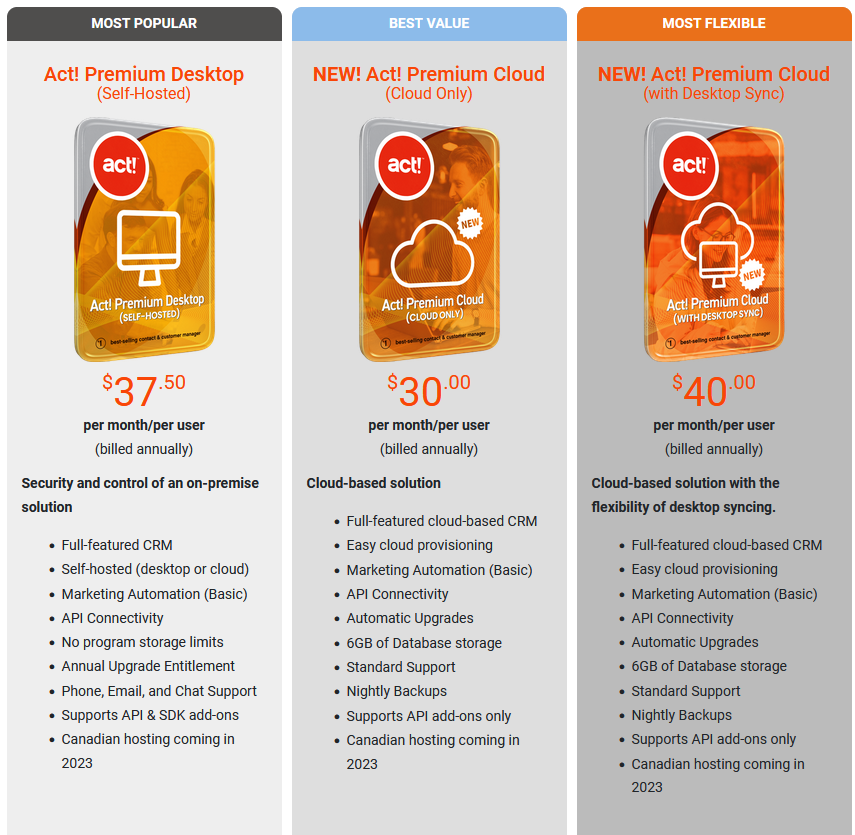
First and foremost, Happy New Year! Is it just me, or has the pandemic skewed time? Time is flying by at a rapid pace, or so it seems. Act pricing has not changed and you have 7 pricing options that I will outline for you today. They include the following prices:
- Act Premium Desktop (Yearly Subscription is $380 upgrade pricing and $450 for new users): This is Act software that is downloaded and physically installed on the hard drive of your computer. Multiple individuals can also use it in a network environment in which you install Act on your company server and linked desktops. If you don’t have a server or expertise to deploy Act, we offer hosting solutions.
- Act Premium Cloud (Yearly Subscription is $360 per user): This is Act in the cloud only. You login via a web browser, and there is no software to install. I love this option and have been using it exclusively since late December 2020. Act is unique because most CRM products are web-based. Act has desktop software and web-based software options. Our Next option gives you the best of both options.
- Act Premium Cloud with Desktop Sync (Yearly Subscription is $480 and includes Act Premium Cloud and Act Desktop physically installed software): This is truly the best of both Act worlds. Act desktop software has advantages such as not needing to be connected to the internet. There are also add-on products that are best used with Act’s desktop software. However, Act has to be installed and configured, and you must compute the installation cost if you need assistance.
- Act Pro v24 ($450 one-time purchase, a perpetual license): This is do-it-yourself software and is limited to 5-users or fewer. We offer support that is fee-based.
My Thoughts About Annual Subscriptions for ACT CRM
Some people are winding down their careers. Some are simply maintaining a book of business, and they do very little customer follow-up and sales. They don’t see the benefit of a yearly subscription when they only use Act as a glorified Rolodex.
I can understand that to a point.
Why not send out a quarterly email touching their prospects and clients? Act Marketing Automation makes this easy. It doesn’t have to be fancy, it can be a plain simple text email. Strengthening the relationship between you and or contacts is never a bad thing. Is your database an asset that you could sell? It is my feeling that you can judge Act as a tool that is measurable and quantifiable: does it make you money? Can you generate business using Act as a marketing and sales tool? Can one extra sale a year pay for Act many times over? If yes, a subscription is just the cost of doing business. A small cost, a little more than $1.00 a day. Send an email. Make a sale. You can thank me later.
Act Marketing Automation
Act Marketing Automation is a great tool and has different packages to suit your needs. As an annual subscriber, you receive the basic level of Act Marketing Automation so you can take advantage of this fantastic email program built inside of Act. As your needs grow, evolve into the more sophisticated tools available to you.
Act Tools & Add-Ons
Learn all about different Act add-on products that can help you take Act software to a different level. Top-notch software developers have developed tools that enhance and complement the way you use Act. Have an issue or problem? There might be an add-on to solve that problem. Call me to learn more.
Microsoft Word
Microsoft Word is still one of the most important tools used in business today, yet most people only use a fraction of its capabilities. My Microsoft Word training focuses on the top 50 practical tips that everyday users need to work faster, stay organized, and create better documents with confidence. Learn real-world skills such as formatting, templates, tables, headers and footers, shortcuts, document cleanup, and time-saving techniques that make Word easier and far less frustrating to use every day.
Microsoft Excel
Microsoft Outlook
Microsoft Outlook is far more than just an email program. My Outlook training focuses on the top 50 practical tips that help busy professionals stay organized, reduce stress, and communicate more effectively. Learn how to better manage email, calendars, contacts, tasks, categories, folders, and search tools so important information does not get buried. I also teach time-saving shortcuts and real-world strategies that can help you take control of your day instead of letting your inbox control you.
Additional Training
I help small businesses stop underusing their software and start using it to grow. I provide practical, hands-on training in Act CRM, QuickBooks, Microsoft Office, WordPress, ChatGPT, and more — so the tools you already pay for actually work for you. I also design WordPress websites and landing pages using the Divi theme and advise your existing website.
Teach An Old Dog New Tricks
https://www.youtube.com/@TeachAnOldDogNewTricks